Portal - BPAY Document (to make additional payments)
BPAY is a renowned electronic bill payment system in Australia, which allows payments to be made through a financial institution’s online, mobile or telephone banking facility (to registered BPAY billers).
1. To make a BPAY payment on your finance agreement, on the portal select the Manage Applications option under the Applications menu:

2. Select the Agreements tab on the Manage Applications screen:

3. Select the View hyperlink on the bottom left hand corner of a finance agreement:

4. This will then open the details of the Finance Agreement:
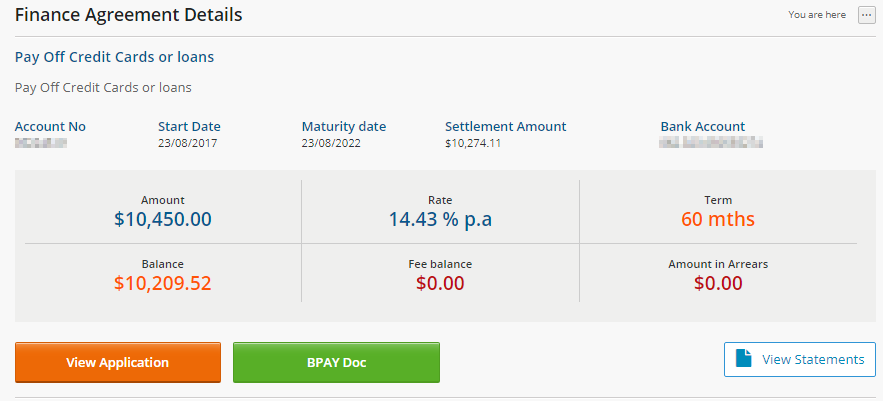
5. Click on the  button located on the bottom left (directly underneath the details) which will then open the BPAY document payment dialog box.
button located on the bottom left (directly underneath the details) which will then open the BPAY document payment dialog box. 6. Enter the amount that you would like to pay using BPAY in the Payment Amount field:
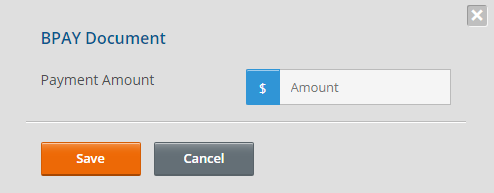
7. Click on the  button to make the payment or the
  button to exit out of the BPAY Document dialog box and go back to the Finance Agreement Details screen.
button to make the payment or the button to exit out of the BPAY Document dialog box and go back to the Finance Agreement Details screen.
8. If saved, it will display the BPAY payment on screen (in PDF format) which can be downloaded or printed for your perusal:
